Passenger portal: the customer checks the trip on their own
New: break-even simulator per trip
Passenger self-service · Less WhatsApp noise

The passenger checks the trip on their own. No calling the agency for every question.

Trip, seat, documents, and statement in the passenger's browser, based on the registered data and the options enabled by the agency. Sign-in asks for CPF and date of birth, with no app to install.

Seat 14 confirmed Boarding in 4 days
Carlos Silva
Largo Glênio Peres · Departs at 07:00
Who's traveling with me Seat 15
Helena Silva (wife)
Agent: Mariana Duarte · Direct WhatsApp
Offline visual prototype · Passenger portal
Passenger portal in the prototype with a fictional trip
Conceptual passenger portal; the person, trip, seat, and actions are fictional. This screenshot does not access a real account.
Seat 14 · Boarding point Voucher · Receipt · Contract Confirmed manual payments
Straight to the point

How the passenger portal works

The customer signs in from a phone or computer browser with CPF and date of birth, with no app to install. After signing in, they view the trips linked to their record. Seat, meeting point, documents, and statement appear according to the data and the agency's settings.

The portal lets the passenger look up information published by the agency whenever they need it, which can reduce repeated questions on WhatsApp.

The service routine

Before the portal vs. with OnWay

The difference between improvising your service or offering the professional experience of a major tour operator.

Without the portal OPERATIONAL NOISE

Overloaded WhatsApp

  • × The same question 30 times: "What's my seat again?" "What time does the bus leave?"
  • × Vouchers and contracts lost in old WhatsApp conversations.
  • × Payment uncertainty: the passenger asks whether the installment was recorded.
  • × Trip photos scattered across loose links or filling up the group's storage.
With OnWay PASSENGER SELF-SERVICE

Elegant self-service

  • ✓ Trip summary with the registered seat, time, and boarding point.
  • ✓ Voucher, contract, and receipts available to generate when the agency enables those documents.
  • ✓ A clear statement with the total amount and every manual payment the agency recorded.
  • ✓ Photos published by the agency and the responsible agent's contact, when configured.
Everything at the customer's fingertips

What the passenger finds in the portal

Information appears according to the trip record and the agency's settings.

Seat and boarding

The seat number highlighted, the check-in time, the meeting point, and the trip destination, in boarding-pass format.

Who's traveling with me

Shows friends or family linked to the same booking when that data is registered.

Dedicated travel agent

Name, photo, and official contact of the consultant responsible for the excursion, with a direct WhatsApp link for support when needed.

Documents in 1 click

Lets the passenger generate and download the voucher, contract, and receipt as PDF when those documents are enabled for the portal.

Statement with agency-recorded payments

A clear breakdown of the total amount, each manual payment recorded by the agency (PIX, card machine, or cash), and the remaining balance.

Itinerary & photo album

Day-by-day trip itinerary with a button to download it as PDF and access to the official photo album shared by the organizers.

Mobile experience

Runs in the browser, feels like an app

No need to ask the customer to open the App Store or Google Play and use up phone memory with another app. The OnWay portal is a Progressive Web App (PWA): fast, lightweight, and secure.

Sign-in with CPF CPF and date of birth are confirmed at sign-in.
Zero installation Access it from the browser without installing another app.
Your agency's brand The customer sees your company's logo and colors.
Try it on my phone →
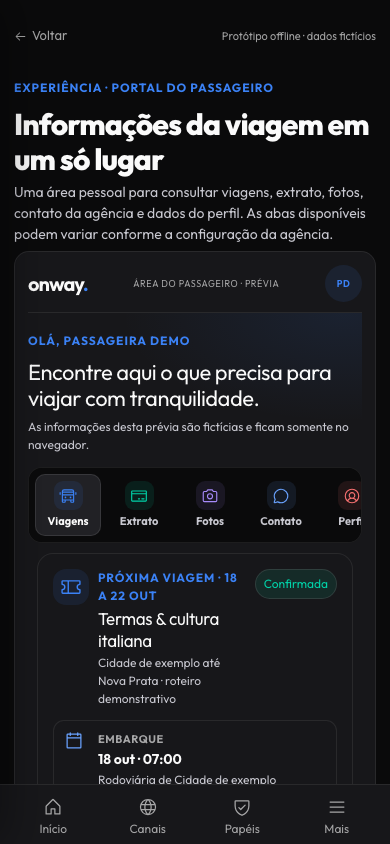
Passenger portal in the prototype with a fictional trip
Passenger portal in a mobile viewport; the person, trip, and actions are fictional. This screenshot does not access a real account.
Lead capture & fast sales

Passenger pre-registration by link

The agency can share the link to a published trip. The traveler fills in their own details and accepts the data-processing terms; depending on the configuration, they complete a pre-registration or a booking without online payment.

Offline visual prototype · Conceptual pre-registration
Prototype pre-registration with form and fictional data
Conceptual pre-registration; fictional data. This illustrative form does not send or store personal data.
Zero manual typing

The passenger fills it in alone

Full name, official ID, phone, and emergency contact registered directly by the holder.

Legal compliance

Active LGPD consent

Data-processing and insurer-sharing terms accepted with a date-and-time record.

CRM follow-up

Follow-up by the team

The record can open a follow-up card in the pipeline. The team reviews the received data before continuing the service.

The portal is one piece of the system

What else OnWay solves

FAQ

Questions about the passenger portal

What does the passenger see in the OnWay portal?

The day-by-day trip itinerary, the payment statement, vouchers, the referral program, and trip photos, plus a direct channel to talk to the agency.

Does the passenger need to install an app?

No. The portal runs in the phone's browser like an app (PWA), without going through an app store.

Does the portal reduce repeated messages to the agency's WhatsApp?

That's the idea: itinerary, payments, and vouchers are available for the passenger to check on their own, so the agency answers fewer repeated questions about what's already in the portal.

Can the passenger refer friends through the portal?

Yes, the referral program appears inside the portal, and the passenger can track the status of each referral they made.

Do the trip photos stay in the portal?

Yes, each passenger can access the trip gallery and search for their own photos, including a selfie-based search feature that is still in beta.

See the passenger portal through your customer's eyes

Message us on WhatsApp and we'll show you the portal as the passenger sees it, from itinerary to statement.

I want to see the passenger portal  See how OnWay works